📚 Ultimate Guide
how to display keyboard collectionmechanical keyboard display ideaskeyboard stand guidekeyboard collectiondisplay tips

The Ultimate Guide to Displaying Your Mechanical Keyboard Collection

Whalebone Team12 min read
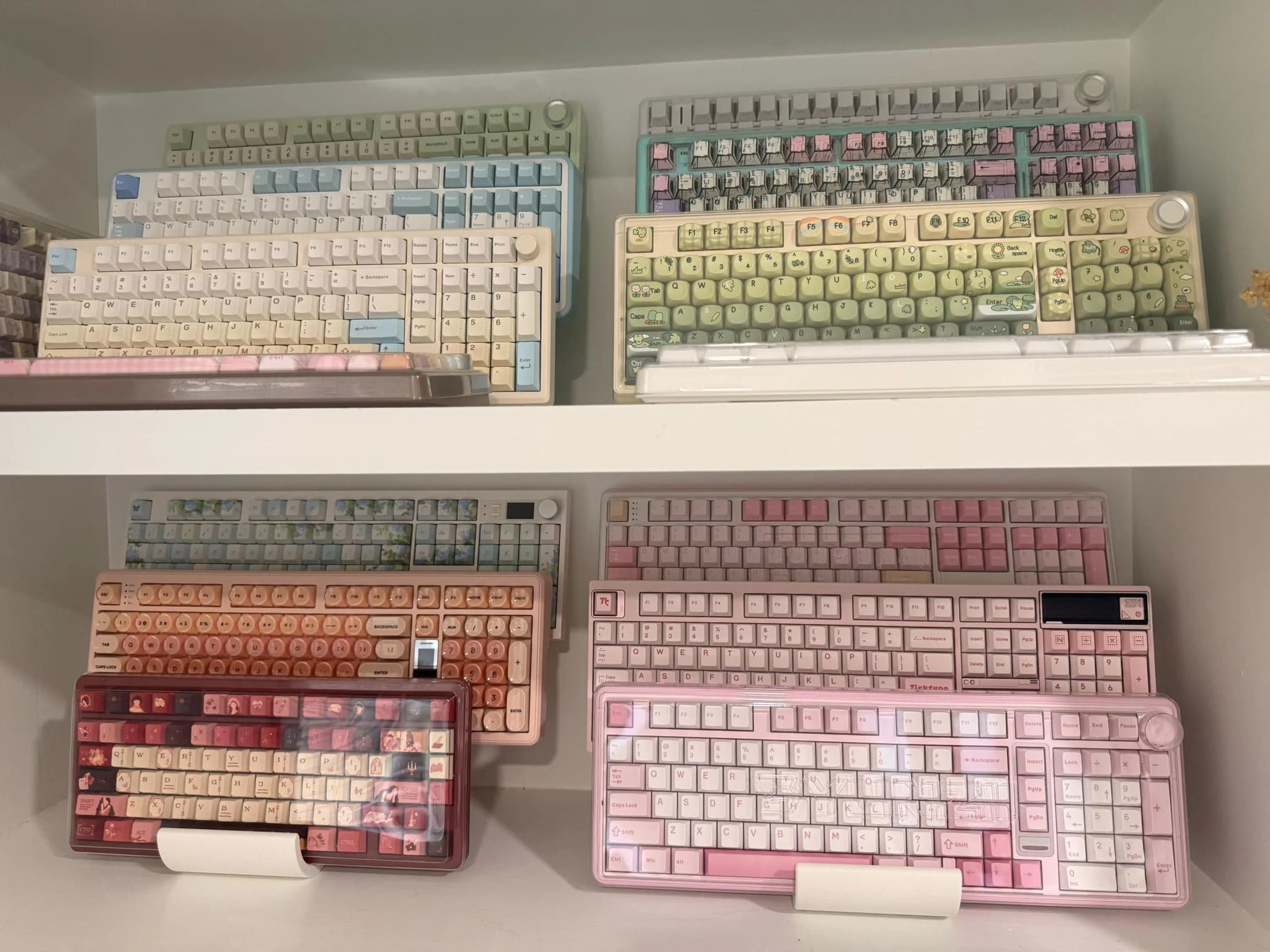
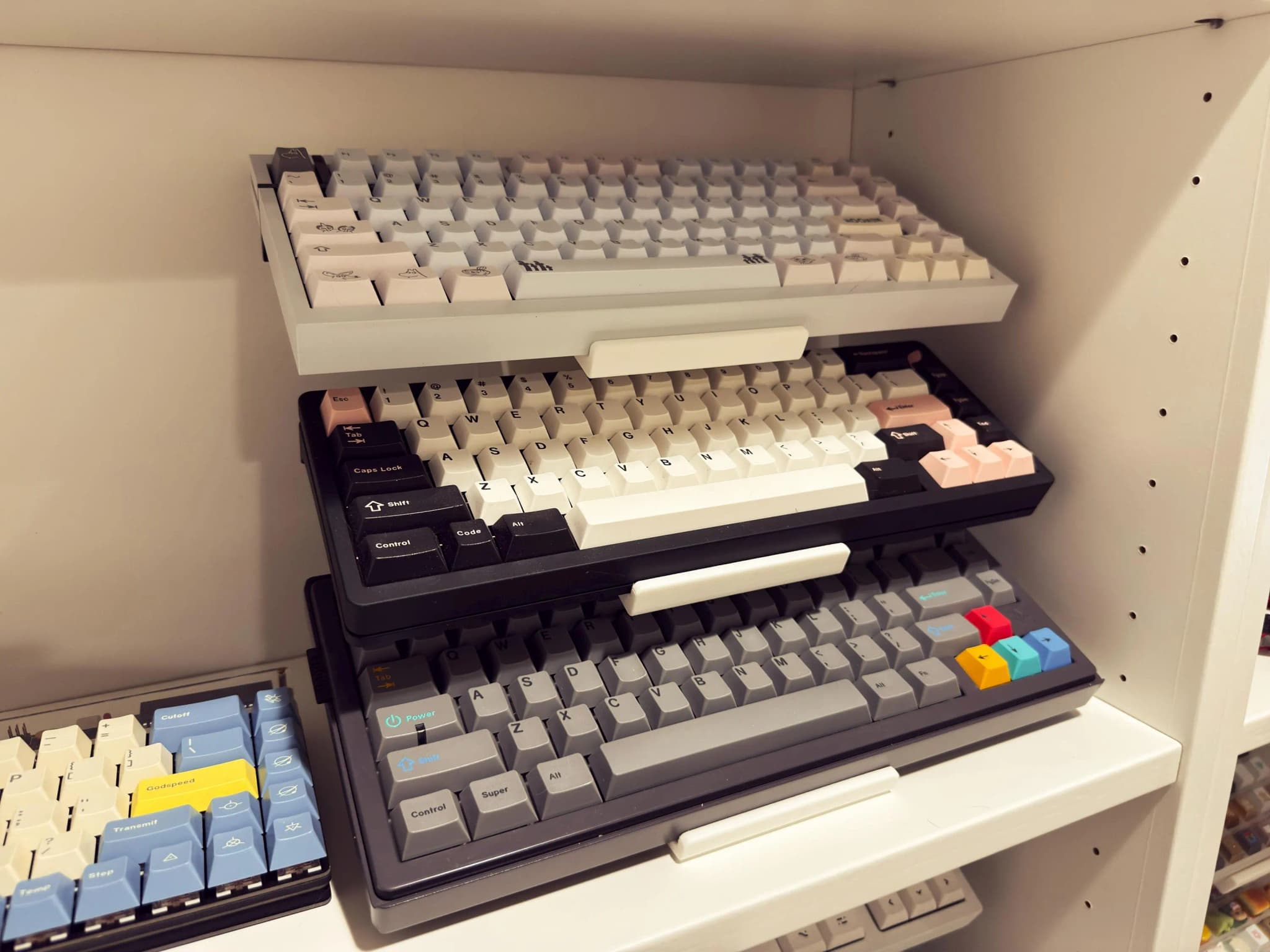
A stunning mechanical keyboard collection displayed on tiered stands with accent lighting

You've spent countless hours researching switches, agonizing over keycap choices, and building the perfect boards. Your mechanical keyboard collection represents hundreds—maybe thousands—of dollars and even more hours of passionate hobby time. But here's the question that haunts many keyboard enthusiasts: How do you display your keyboard collection properly?

Whether you have three boards or thirty, this comprehensive guide will teach you everything you need to know about displaying your mechanical keyboard collection. From choosing the right display method to optimizing lighting, managing humidity, and even photographing your boards for social media—we've got you covered.

Let's transform your keyboard collection from a pile of boxes into a stunning showcase.

Why Display Matters

Before diving into the how, let's talk about the why. Understanding the benefits of proper keyboard display will help you make better decisions about your setup.

Aesthetics: Transform Your Space

A well-displayed keyboard collection becomes a focal point of any room. Instead of hiding your hobby away, you're celebrating it. Your desk or dedicated display area becomes a conversation starter—a museum of your mechanical keyboard journey.

Think about it: you've probably spent hours color-matching keycaps and selecting the perfect case. Why let those beautiful boards sit in boxes unseen?

Protection: Preserve Your Investment

Here's something many collectors don't consider: proper display actually protects your keyboards better than improper storage.

Keyboards stacked in boxes can:

  • Develop scratches from friction
  • Accumulate moisture in sealed containers
  • Suffer keycap damage from pressure
  • Attract pests looking for dark spaces

A quality display stand with proper padding keeps your boards separated, visible (so you notice any issues), and well-ventilated.

Easy Access: Actually Use Your Collection

The biggest problem with keyboard collecting? Most enthusiasts only use one or two boards while the rest gather dust. Why? Because swapping keyboards is a hassle when they're buried in boxes.

Displayed keyboards are accessible keyboards. When your TKL is right there on a stand, you'll actually swap it in for that afternoon gaming session. When your 60% is visible and ready, you'll grab it for that weekend coding project.

A good display turns your collection from a burden into a rotation.

Appreciation: Enjoy What You've Built

There's genuine joy in looking at a beautiful keyboard. The way light catches a polished aluminum case, the satisfying uniformity of a well-made keycap set, the unique personality of each board in your collection.

Display isn't just about showing off—it's about daily appreciation of something you've worked hard to curate.

Types of Keyboard Displays

Not all display methods are created equal. Here's a comprehensive breakdown of your options:

Tiered Keyboard Stands

The most popular choice for serious collectors.

Tiered stands allow you to display multiple keyboards in the footprint of one, with each board visible and accessible. They work like stadium seating for your boards.

Pros:

  • Space efficient (3-6 boards in one footprint)
  • Every keyboard visible
  • Easy access to any board
  • Great for desk setups

Cons:

  • Takes up some desk space
  • Requires flat, stable surface

Best for: Active collections you use regularly, desk setups, photography

Our Classic Stand exemplifies this design with 5-tier capacity and cork padding throughout.

Wall-Mounted Displays

Perfect for those with limited desk space or gallery-style aesthetics.

Wall mounting treats your keyboards as art pieces. Specialized brackets or shelves hold boards vertically against the wall.

Pros:

  • Zero desk space used
  • Art gallery aesthetic
  • Great for statement pieces

Cons:

  • Requires wall modification
  • Cable management challenging
  • Not ideal for heavy boards

Best for: Display-only boards, small rooms, minimalist setups

Display Cases

The museum approach—maximum protection with visibility.

Glass or acrylic cases fully enclose your keyboards while keeping them visible. Think of jewelry store displays.

Pros:

  • Maximum dust protection
  • Humidity control possible
  • Museum-quality presentation

Cons:

  • Expensive
  • Not easily accessible
  • Takes significant space

Best for: Rare or vintage boards, high-humidity environments, valuable collections

Shelf Systems

Versatile and expandable for growing collections.

Standard shelving (floating shelves, bookcases, cube storage) can work for keyboard display with some modification.

Pros:

  • Readily available
  • Expandable
  • Multi-purpose

Cons:

  • Not designed for keyboards
  • May need padding added
  • Less visual impact

Best for: Budget setups, mixed-use spaces, large collections

Dedicated Keyboard Furniture

Purpose-built display units for the ultimate enthusiast.

Some collectors commission or build dedicated furniture pieces specifically for keyboard display—think keyboard-sized cubbies built into a desk or a custom cabinet.

Pros:

  • Perfect fit for your collection
  • Integrated with workspace
  • Maximum customization

Cons:

  • Expensive/time-consuming
  • Not portable
  • Requires planning

Best for: Permanent setups, ultimate enthusiasts, custom spaces

Keyboard Stand Comparison

Let's compare the most popular stand options to help you choose:

Budget Tier ($15-30)

Entry-level stands typically feature:

  • Single-tier design
  • Basic materials (acrylic or simple 3D print)
  • 1-2 keyboard capacity
  • Minimal padding

Our Budget Stand offers 3D-printed quality with cork padding at an accessible price point—proving budget doesn't mean sacrificing protection.

Who should buy: New collectors, single-board display, testing the waters

Mid-Range Tier ($30-60)

The sweet spot for most collectors:

  • Multi-tier designs (3-4 keyboards)
  • Quality materials
  • Proper padding included
  • Various angle options

This tier offers the best value for most enthusiasts. You get multiple-board capacity without premium pricing.

Who should buy: Active collectors with 3-10 boards, daily rotation users

Premium Tier ($60-100+)

For those who want the best:

  • Premium materials (hardwood, aluminum, high-quality prints)
  • 5+ keyboard capacity
  • Advanced features (cable management, lighting integration)
  • Custom sizing options

Our Butterfly Stand represents premium design thinking with its unique angled architecture that maximizes visibility.

Who should buy: Serious collectors, photography enthusiasts, those who want the best

Material Comparison

MaterialWeightDurabilityCustomizationPriceEnvironmental
3D Printed (PLA+)LightHighExcellent$$Eco-friendly
WoodMediumHighModerate$$$Sustainable
AcrylicLightMediumLow$Recyclable
MetalHeavyVery HighLow$$$$Durable

Our recommendation: 3D printed PLA+ offers the best combination of customization, protection, and value. It's what we use at Whalebone because it allows us to create perfect keyboard-specific designs.

Room Setup Considerations

Your display is only as good as its environment. Here's how to optimize your space:

Lighting

The single biggest factor in how your keyboards look.

Natural Light:

  • Avoid direct sunlight (causes keycap fading)
  • North-facing windows provide soft, even light
  • Diffused natural light is ideal for photography

Artificial Light:

  • LED strips under each tier create drama
  • 2700K-4000K color temperature works best
  • Avoid harsh overhead lighting
  • Consider smart bulbs for adjustable ambiance

Lighting Setup Ideas:

  1. Under-tier LED strips (pointing up) for dramatic shadows
  2. Desk lamp with diffuser for photography
  3. Wall-mounted indirect lighting for ambient glow
  4. RGB strips for accent colors (use sparingly)

Dust Management

Dust is the enemy of displayed keyboards. Here's your battle plan:

Prevention:

  • Keep displays away from windows and HVAC vents
  • Use an air purifier in the display room
  • Consider covered displays for rarely-used boards
  • Keep room doors closed

Maintenance:

  • Weekly dusting with a soft brush
  • Monthly compressed air cleaning
  • Quarterly keycap removal and deep clean
  • Annual switch plate cleaning

Pro Tip: Microfiber cloths for cases, soft-bristle brushes for keycaps, and datavac-style blowers beat canned air every time.

Humidity Control

Keyboards contain plastic, metal, and sometimes wood—all materials affected by humidity.

Ideal Range: 40-60% relative humidity

Too Low (Below 40%):

  • Plastic becomes brittle
  • Increased static electricity
  • Dry lubricants may degrade faster

Too High (Above 60%):

  • Metal corrosion risk
  • Keycap warping (especially PBT)
  • Switch housing swelling
  • Mold/mildew in extreme cases

Solutions:

  • Invest in a hygrometer ($10-20) to monitor levels
  • Use a dehumidifier in humid climates
  • Humidifier in dry climates/winter
  • Silica gel packets in closed displays

Temperature

Keep your display area at consistent room temperature (65-75°F / 18-24°C). Avoid:

  • Spaces near heating vents
  • Areas that get direct afternoon sun
  • Uninsulated garages or attics
  • Rooms with large temperature swings

Organizing by Keyboard Size

Different keyboard sizes have different display needs. Here's how to organize them:

60% Keyboards

The compact champions of the keyboard world. At just 60% of a full-size board, these are your most flexible display options.

Display Tips:

  • Work great on upper tiers (lighter weight)
  • Can fit 2 side-by-side on some stands
  • Ideal for wall mounting
  • Perfect for deep shelves

Popular Layouts: HHKB, Poker, Anne Pro style

65% and 68% Keyboards

The balanced choice—arrow keys without taking much more space.

Display Tips:

  • Similar to 60% but need slightly more width
  • Excellent for middle tiers
  • Good visibility of arrow cluster makes them display-worthy

Popular Layouts: Keychron K6, NK65, Blade style

75% Keyboards

Compact but complete with function row included.

Display Tips:

  • More visual presence than 60-65%
  • Great for showcasing unique F-row keycaps
  • Consider middle to lower tiers for stability

Popular Layouts: Satisfaction75, Mode Eighty, Keychron Q1

TKL (Tenkeyless) Keyboards

Display Tips:

  • The classic enthusiast layout
  • Large enough to be a focal point
  • Lower tiers recommended for stability
  • Good for showing off artisan keycaps

Popular Layouts: Mode Sonnet, Zoom TKL, classic TKL

Full-Size and 96% Keyboards

The productivity powerhouses—every key included.

Display Tips:

  • Require dedicated stand space
  • Bottom tiers only (weight and size)
  • Consider standalone display for emphasis
  • Great for typing demos or reference boards

Mixed-Size Display Strategy

The Rule of Weight: Heaviest boards on bottom, lightest on top.

The Rule of Frequency: Most-used boards most accessible.

Grouping Options:

  1. By size (all 60% together, all TKL together)
  2. By use case (gaming boards, typing boards, work boards)
  3. By colorway (matching aesthetics together)
  4. By acquisition (chronological display)

Our Recommendation: Group by use case with most-used boards at eye level. This balances aesthetics with functionality.

Photography Tips for Sharing Online

Half the fun of keyboard collecting is sharing your boards online. Here's how to take photos that do your collection justice:

Basic Equipment

Camera:

  • Modern smartphone is sufficient
  • DSLR/mirrorless for serious photography
  • Tripod or stable surface essential

Lighting:

  • Natural window light (clouded day is ideal)
  • Desk lamp with diffuser
  • LED panels for consistent results
  • Avoid direct flash

Composition Tips

The Hero Shot:

  • Slight angle (15-30 degrees)
  • Focus on keycaps
  • Blurred background
  • Leading lines toward keyboard

The Collection Shot:

  • Uniform lighting across all boards
  • Consistent angles
  • Clean, uncluttered background
  • Show the full display setup

The Detail Shot:

  • Macro lens or macro mode
  • Focus on unique features (artisans, switches, legends)
  • Very shallow depth of field
  • Extreme close-ups

Background Options

Simple:

  • Desk mat (solid color)
  • White poster board
  • Black fabric

Contextual:

  • Your actual desk setup
  • Display stand with other boards
  • Lifestyle (with coffee, plants, etc.)

Post-Processing

Mobile Apps:

  • Lightroom Mobile (free with premium features)
  • VSCO
  • Snapseed

Desktop:

  • Adobe Lightroom
  • Capture One
  • Free options: GIMP, RawTherapee

Basic Edits:

  1. Adjust exposure (slightly bright is better)
  2. Increase contrast slightly
  3. Adjust white balance (warm vs. cool)
  4. Sharpen keycaps
  5. Crop for composition

Platform-Specific Tips

Reddit (r/MechanicalKeyboards):

  • High resolution images
  • Include specs in comments
  • Multiple angles appreciated
  • Natural lighting preferred

Instagram:

  • Square or 4:5 ratio
  • Consistent filter/style
  • Stories for behind-the-scenes
  • Hashtags: #mechanicalkeyboard #keycaps #keyboardcommunity

Discord:

  • Any ratio works
  • Quick phone photos accepted
  • Comparison shots popular
  • WIP (work in progress) appreciated

Community Showcase Examples

Let's look at how fellow enthusiasts display their collections:

The Minimalist Setup

Philosophy: One board in use, one on display, rotate regularly.

Components:

  • Flat Stand on desk corner
  • Clean desk with minimal accessories
  • Focus on the keyboard as art

Why it Works: Less is more. Each keyboard gets full attention. Easy to maintain. Forces mindful collecting.

The Collector's Display

Philosophy: Show everything, access everything.

Components:

  • Multiple tiered stands
  • Dedicated display wall or shelf
  • Full-size Classic Stand as centerpiece
  • Organized by size or colorway

Why it Works: Your full collection is visible and inspiring. Easy rotation. Great for large collections (10+ boards).

The Content Creator Setup

Philosophy: Photography-first display with lighting integration.

Components:

  • Display stand with built-in LED lighting
  • Backdrop options nearby
  • Photography area integrated with display
  • Easy-swap accessibility

Why it Works: Every board is photo-ready. Consistent content output. Great for YouTube/streaming.

The Hybrid Office

Philosophy: Professional workspace with subtle keyboard hobby presence.

Components:

  • Main board on desk (daily driver)
  • Small stand with 2-3 favorites nearby
  • Collection storage nearby but not visible
  • Clean, professional appearance

Why it Works: Balances work and hobby. Doesn't overwhelm the space. Rotation is easy.


The Bottom Line: Start Displaying

Whether you have one keyboard or fifty, proper display transforms your collection from hidden boxes to daily inspiration.

Start simple:

  1. Get a quality stand with padding (browse our collection)
  2. Find a spot with good lighting and stable temperature
  3. Display your favorite boards
  4. Rotate and enjoy

Level up over time:

  • Add LED lighting
  • Create a dedicated display area
  • Document with photography
  • Share with the community

Your keyboards deserve to be seen. Your space deserves the beauty they bring. And you deserve to enjoy the collection you've worked so hard to build.

Ready to get started? Check out our keyboard display stands designed specifically for mechanical keyboard enthusiasts like you.


This guide will be updated as we learn more from the community. Have display tips to share? Contact us—we'd love to feature your setup!

❓ Frequently Asked Questions

What is the best way to display a mechanical keyboard collection?

The best way to display a mechanical keyboard collection is using tiered display stands that allow you to showcase multiple boards in a compact space while keeping them accessible. Look for stands with protective padding (like cork or felt) to prevent scratches, and position them away from direct sunlight to prevent keycap fading.

How many keyboards can fit on a typical display stand?

A typical tiered keyboard stand can display 3-6 keyboards depending on the design. Single-tier flat stands hold one keyboard, while multi-tier stands like our Classic Stand can display up to 5 keyboards. The Butterfly Stand with its unique angled design can display 4-6 keyboards efficiently.

Do keyboard display stands damage keyboards?

Quality keyboard display stands with proper padding (cork, felt, or silicone) will not damage your keyboards. In fact, they often protect keyboards better than storing them in boxes or stacked on top of each other. Look for stands specifically designed for mechanical keyboards that account for the weight and structure of these boards.

What is the ideal humidity level for storing and displaying keyboards?

The ideal humidity level for displaying mechanical keyboards is 40-60% relative humidity. Too low humidity can cause plastic to become brittle, while too high can lead to corrosion on metal components and warping of keycaps. Consider using a hygrometer to monitor your display area.

How do I prevent dust on displayed keyboards?

To minimize dust on displayed keyboards: use a display case with glass or acrylic panels if possible, dust regularly with a soft brush or compressed air, keep keyboards covered when not in use, consider an air purifier in your display room, and position displays away from high-traffic areas.

Should I remove keycaps before displaying keyboards?

No, you should display keyboards with keycaps installed as they are part of the aesthetic appeal. However, you should ensure keycaps are clean before displaying, and avoid direct sunlight which can cause fading, especially on ABS keycaps.

What lighting works best for keyboard displays?

LED strip lighting with warm white (2700-3000K) or neutral white (4000K) works best for keyboard displays. Position lights under each tier pointing upward for dramatic effect, or use indirect lighting from above. Avoid direct overhead lighting which creates harsh shadows. RGB lighting can add flair but may distract from keycap colors.

How do I organize keyboards of different sizes on the same stand?

For mixed-size collections, place larger keyboards (full-size, 96%) on bottom tiers where they have more space and stability. Put smaller boards (60%, 65%) on upper tiers. Alternatively, group by size across multiple stands for a more organized appearance.

Can I display keyboards vertically or on walls?

Yes, keyboards can be displayed vertically or on walls using specialized wall mounts or shelf brackets. However, ensure mounts are secure and rated for the keyboard weight (typically 1-3kg). Wall mounting works best for boards with cables that can be hidden behind the wall.

What material is best for keyboard display stands?

The best materials for keyboard display stands include: 3D printed PLA+ (lightweight, customizable, eco-friendly), wood (warm aesthetic, sturdy), acrylic (clear visibility, modern look), and metal (durable, minimal). 3D printed stands offer the best combination of customization, protection, and value.

Ready to display your keyboards?

Browse our collection of premium keyboard stands, designed for enthusiasts like you.

Shop Stands