Why 60% Keyboards Are Overrated (And What You Should Buy Instead)
Hot take incoming: The 60% keyboard has become the default recommendation in the mechanical keyboard community, and I think that's a problem.
Don't get me wrong—60% keyboards are beautiful, portable, and there's something undeniably satisfying about mastering a minimal layout. But somewhere along the way, "60% is the enthusiast choice" became gospel, and a lot of people bought into a layout that actively fights their workflow.
Let's talk about it.
The 60% Cult and How We Got Here
First, some credit where it's due. The 60% keyboard revolution gave us:
- Beautiful minimalism — There's no denying the aesthetic appeal
- Desk space for days — More room for mouse movements
- Portability — Actually fits in a bag
- The Poker legacy — The OG that started it all
The 60% layout became the default enthusiast recommendation for good reasons. It looks incredible in photos. It's the go-to for group buys and custom builds. Every major custom board started as a 60%.
And then something happened: 60% stopped being a choice and started being an identity.
New enthusiasts got the message loud and clear: Real keyboard enthusiasts use 60%. If you need more keys, you're just not advanced enough yet.
Here's my unpopular opinion: That's gatekeeping disguised as advice.
The best keyboard size isn't about proving your touch-typing credentials. It's about matching your layout to your actual workflow. And for most people? 60% is a compromise they don't need to make.
What You're Actually Giving Up
Let's be brutally honest about what disappears when you go 60%:
Arrow Keys
"Just use HJKL/IJKL on a layer" they say. And yes, you can. But here's what that actually means:
- Selecting text requires holding Fn + Shift + arrow layer
- Scrolling through documents becomes a two-hand operation
- Quick navigation while mouse is in hand? Forget it.
- Every single arrow key press now requires a layer toggle
For coding, writing, spreadsheets, or basically any text-heavy work, this adds up to thousands of extra keystrokes per day.
Function Row (F1-F12)
Think you don't use function keys? Track your usage for a week:
- F2 — Rename files in every file browser
- F5 — Refresh, debug run, presentation mode
- F11 — Fullscreen toggle
- Alt+F4 — Close window (now a three-key combo becomes four)
- IDE shortcuts — Nearly all of them
"I'll just remap everything" works until you switch computers, use someone else's machine, or help a coworker.
Navigation Cluster
The most underrated loss:
- Delete key — forward-delete, not backspace
- Home/End — jump to line start/end instantly
- Page Up/Down — actual document navigation
- Insert — okay, nobody misses Insert
If you work with text professionally, losing instant access to these keys is like losing a limb.
The Hidden Cost: Context Switching Tax
Every time you reach for a key that isn't there, you pay a mental tax. Your brain has to:
- Remember the key doesn't exist
- Recall which layer has it
- Execute the layer combo
- Continue your actual task
Individually, tiny. Across an 8-hour workday? You're bleeding productivity and focus through a thousand small cuts.
The Muscle Memory Myth
Here's where I'm going to make some enemies.
The community's standard line is: "Just give it a week, muscle memory will kick in, and you'll be faster than ever."
This is at best oversimplified, at worst completely wrong.
What the Research Says
Actual motor learning studies suggest:
- Simple substitutions (moving a single key) take 1-2 weeks to feel natural
- Complex patterns (layer-based chords) take 4-8 weeks for proficiency
- Full automaticity (zero conscious thought) takes 2-3 months minimum
And that's under ideal conditions—consistent practice, motivation, and no interference from using normal keyboards.
The Reality
Most of us:
- Use laptops with normal layouts sometimes
- Share computers occasionally
- Don't have months to retrain muscle memory
- Get frustrated before the "magic" happens
I've seen dozens of enthusiasts in forums confess: "I've had my 60% for 6 months and arrow keys on a layer still feel awkward."
They're told they're doing it wrong. Maybe they're just using the wrong layout.
The Sunk Cost Trap
Once you've bought a $300+ custom 60% and spent weeks learning layers, admitting it doesn't work for you feels like failure. So you don't. You convince yourself it's great because the alternative is acknowledging you made a $300 mistake.
This is how 60% recommendations perpetuate. It's not malicious—it's human psychology.
Who 60% is ACTUALLY Perfect For
Let me be clear: 60% keyboards are legitimately great for some people. You might be one of them if:
You're a True Minimalist
Your desk has a keyboard, mouse, and nothing else. You've optimized your workflow around minimal inputs. You've genuinely found that fewer keys = fewer distractions.
Portability is Non-Negotiable
You travel constantly. You work from coffee shops. You need a board that disappears into a laptop bag. No larger layout can match 60% portability.
You're Gaming-Only (FPS)
You need maximum mouse space. You've rebound everything to accessible keys anyway. You never use function keys in-game.
You've Genuinely Tried Alternatives
You've spent real time with 65%, 75%, and TKL. You understand what you're giving up. And you consciously choose 60% anyway because it suits your workflow.
You're Not One of the Above?
Keep reading.
The 65% Compromise: Best of Both Worlds?
If I had to recommend one layout for most enthusiasts, it's 65%.
What 65% Gives You
For approximately one extra inch of width, you get:
- Dedicated arrow keys — No layers needed
- Delete key — Right where you expect it
- Some navigation — Usually Page Up/Down, sometimes Home/End
- The compact aesthetic — Still looks minimal and clean
What 65% Layouts Exist
The 65% space has exploded with excellent options:
- HHKB-style 65% — Split backspace, blocker between arrows
- Standard 65% — Balanced key spacing throughout
- Exploded 65% — Small gaps for key cluster separation
Why 65% Hits Different
The magic of 65% is that you don't have to think about it.
Arrow navigation just works. Text selection just works. You can hand your keyboard to anyone, and they can use it. You're not slower on other people's machines.
It's the smallest layout that doesn't require you to rewire your brain.
65% for Display
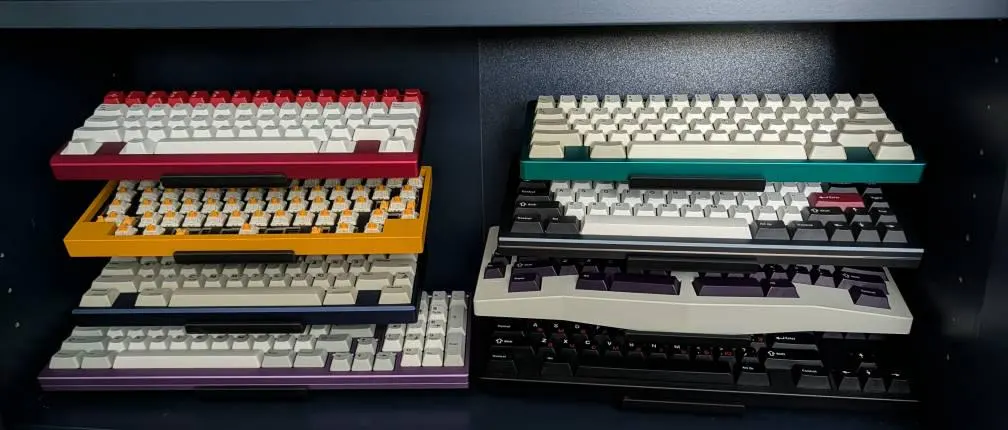
A 65% keyboard is compact enough to display multiple on a stand but large enough to show off beautiful keycap sets. Check out our Classic Stand which handles 65% boards beautifully across all 5 tiers.
TKL: The Forgotten King
While the community obsesses over 60% and 65%, TKL (tenkeyless) quietly remains the most practical layout for most use cases.
Why TKL Got Forgotten
TKL isn't as photogenic. It doesn't say "I'm an enthusiast." It's what normies use. The horror.
But strip away the identity politics, and TKL is almost objectively the best layout for productivity:
TKL Keeps Everything That Matters
- Full function row — F1-F12, zero compromises
- Navigation cluster — Insert, Delete, Home, End, Page Up, Page Down
- Arrow keys — Big, separated, unmistakable
- Standard bottom row — Easy keycap compatibility
TKL Drops Only What You Don't Need
Be honest: when did you last use the numpad?
If you're not doing heavy data entry, the numpad is just eating desk space. TKL removes it and nothing else.
TKL Still Has Enthusiast Cred
Some legendary boards are TKL:
- Mode Sonnet
- Zoom TKL
- Keycult No. 2
- Iron180
TKL gives you all the premium custom keyboard goodness without the layout compromises.
Display Your TKL Collection
TKL boards make stunning display pieces because they show off more keycaps while still fitting on tiered stands. Our Butterfly Stand displays TKL boards at the perfect angle.
Hot Take: 75% is the New 60%
Here's my spiciest opinion: 75% is where the smart money is going.
75% is Compressed TKL
Imagine TKL functionality smashed into a compact frame. That's 75%.
You get:
- Full function row
- Arrow keys
- Navigation column (compressed)
- Compact footprint (barely bigger than 65%)
The 75% Renaissance
The market has noticed. Recent enthusiast favorites skew 75%:
- Satisfaction75 — The hype is real
- Mode Eighty
- Keychron Q1 — Brought 75% to the masses
- GMMK Pro — Entry-level but solid
Why 75% Makes Sense Now
Early 75% layouts were awkward—weird key sizes, odd spacing. Modern 75% designs have solved these problems with clever layouts and standardized sizing.
The "75% is cramped" criticism no longer applies to well-designed modern boards.
75% is the Thinking Enthusiast's Layout
You're not giving up meaningful functionality. You're not adding unnecessary bulk. You're making a considered tradeoff that makes sense for how people actually use keyboards.
That's not less enthusiast—it's more.
Matching Your Layout to Your Life
So what should YOU buy? Here's my framework:
Choose 60% If:
- Portability is your #1 priority
- You've mastered layers and genuinely prefer them
- You're exclusively gaming (FPS)
- Aesthetic trumps all other concerns
Choose 65% If:
- You want compact without compromises
- You need arrow keys daily
- You're not interested in layer gymnastics
- You want "just works" out of the box
Choose 75% If:
- You use function keys regularly
- You want maximum functionality, minimum size
- You're coming from a laptop keyboard
- You like having every key just in case
Choose TKL If:
- You prioritize productivity and comfort
- You want zero learning curve
- You're not space-constrained
- You value separated key clusters
Choose Full-Size If:
- You do data entry or accounting
- You live in spreadsheets
- Your desk has ample space
- You actually use the numpad
The Bottom Line
The 60% keyboard is a legitimate choice—for some people. But the mechanical keyboard community has overcorrected, pushing 60% as the default when it's really a specialized tool.
There's no shame in wanting dedicated arrow keys. There's no shame in preferring a function row. These aren't training wheels—they're features that make you more productive.
The best keyboard is the one that disappears while you work. For many people, that's not a layout that requires constant layer juggling.
Whatever size you choose, display it proudly. Check out our collection of keyboard stands designed for every layout from compact 60% to full-size. Our stands feature cork padding to protect your investment and adjustable tiers to accommodate any keyboard size.
Match your layout to your life, not your Reddit feed.
Ready to display your keyboard collection, whatever the size? Browse our keyboard display stands designed to showcase any layout beautifully.
❓ Frequently Asked Questions
Is a 60% keyboard worth it?
A 60% keyboard is worth it only if you genuinely prioritize portability and minimal desk footprint over convenience. For most users—especially those who code, work with spreadsheets, or do any text editing—a 65% or 75% keyboard offers a much better balance of compact size and functionality.
What is the best keyboard size for gaming?
For gaming, TKL (tenkeyless) or 75% keyboards offer the best balance. You get more mouse space than a full-size while keeping the function row for games that use F-keys. 60% can work for FPS games but becomes limiting for MMOs, strategy games, or titles with extensive keybinds.
What is the difference between 60% and 65% keyboard?
The main difference is arrow keys and a navigation column. A 65% keyboard adds dedicated arrow keys and usually Delete, Page Up, and Page Down. This makes a huge practical difference for text editing, coding, and general productivity while only adding about 1 inch of width.
How long does it take to get used to a 60% keyboard?
Contrary to popular claims of "a few days," most users need 2-4 weeks to become proficient with 60% layers, and 2-3 months before it feels truly natural. Some users never fully adapt and experience persistent frustration, especially for tasks requiring frequent arrow key or function row use.
Is TKL better than 60%?
For most users, yes. TKL keyboards offer all the benefits of removing the numpad (more mouse space, better ergonomics) while keeping function keys and navigation cluster that many workflows depend on. TKL is the "safe" choice that works well for nearly everyone.
Why do people like 60% keyboards?
The 60% keyboard became popular for its minimal aesthetic, extreme portability, and the enthusiast community culture around mastering layers. It also became a status symbol showing you're "advanced enough" to use a reduced layout. Many genuinely prefer it—but many also use it despite it not being optimal for their workflow.
What size keyboard is best for programming?
For programming, 65% or 75% keyboards hit the sweet spot. You need arrow keys constantly (code navigation), often use function keys (debugging, IDE shortcuts), and benefit from Home/End/PgUp/PgDn for code navigation. A 60% can work but adds friction to common operations.
Should I get a 75% or TKL keyboard?
Choose 75% if you want maximum functionality in minimum space—it's essentially a compressed TKL. Choose TKL if you prefer a more traditional layout with more spacing between key clusters, making it easier to find keys by feel. Both are excellent choices for productivity.
Ready to display your keyboards?
Browse our collection of premium keyboard stands, designed for enthusiasts like you.
Shop Stands