Classic vs. Angled Keyboard Stands: Tiers, Dimensions and Display
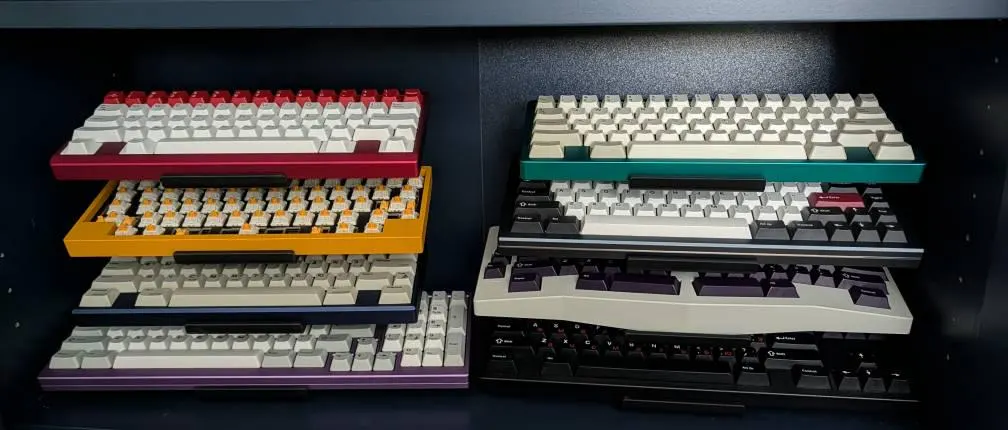
Classic is the shallower choice for a vertical keyboard collection. Angled presents the keycap faces more openly and takes more front-to-back space. Compare the same tier count before deciding: the default Classic preview has four tiers, while the default Angled preview has three.
Compare the same configuration
These measurements compare the 3-tier, 4-inch-wide versions. They come from the outer bounds of our production 3D models, the same measurements used in the size guide.
| Measurement or option | Classic | Angled |
|---|---|---|
| Available tier counts | 3, 4, 5 | 2, 3, 4 |
| Stand width, compared configuration | 101.6 mm (4.00 in) | 101.6 mm (4.00 in) |
| Stand depth, compared configuration | 164.9 mm (6.49 in) | 229.3 mm (9.03 in) |
| Stand height, compared configuration | 166.6 mm (6.56 in) | 229.6 mm (9.04 in) |
| Width choices | 4, 8 or 12 inches | 4, 8 or 12 inches |
| Cork padding | Optional | Optional |
| USB cutouts | Optional | Optional |
For this configuration, Classic is 64.4 mm shallower and 63.0 mm shorter. Those are stand-only dimensions: your keyboard cases, keycaps and cables can extend outside them. Leave room above and in front to lift a board out.
When Classic fits your desk
Choose Classic when depth is limited and you want three to five keyboards in a vertical arrangement. The five-tier version is the largest Classic configuration; it does not hold six keyboards in six separate positions.
Measure any shelf or monitor overhang as well as the desktop. A stand that fits underneath an overhead shelf may still leave too little room to remove the top keyboard. If the keyboard you use most often is difficult to reach, keep it on the desk and use the stand for the rest of your rotation.
When Angled fits your display
Choose Angled when seeing the keycap faces is the priority and you have room for its depth. Its two-, three- and four-tier versions let you build a display around a smaller rotation without buying more positions than you need.
Use the 3D configurator to compare the side profiles at your chosen tier count. Rotate the preview toward the viewing angle you expect from your chair or camera, then check the measurements against your desk. The preview helps with orientation; it cannot certify the fit of every keyboard case.
Check width, contact points and cables
The 4-, 8- and 12-inch options describe the stand width, not a maximum keyboard length. Check where the support will meet your keyboard's underside, especially around feet, rounded cases and protruding connectors. A wider stand changes those contact points; it does not automatically guarantee compatibility.
Cork is an optional contact surface. USB cutouts provide openings for cable routing; check your port position and connector clearance rather than assuming every cable will line up. Neither option changes the selected number of tiers.
See real collections before choosing
The photo above comes from an Etsy customer review. Browse the customer photo gallery for more shelves, desks and keyboard combinations. These are examples of customer arrangements, not measurements of the current configuration you are ordering.
For all five styles, use the keyboard stand buying guide. For current prices and available options, open the product page or configurator.
❓ Frequently Asked Questions
How many tiers do Classic and Angled stands offer?
Classic offers 3, 4, 5 tiers. Angled offers 2, 3, 4 tiers. Choose the tier count when ordering; these are separate configurations, not adjustable shelves.
Is cork included on both models?
Cork padding is optional on both Classic and Angled. Select the cork option when configuring your stand.
Does a 4-inch stand only fit a 4-inch keyboard?
The width option describes the stand, not the full keyboard width. A keyboard can extend beyond the sides. Check its underside, feet, balance and contact points against the stand before choosing a width.
Ready to display your keyboards?
Browse our collection of premium keyboard stands, designed for enthusiasts like you.
Shop Stands